
Google Apps Script for businesses: what it automates, its limits, and when it is not enough

Many companies working with Google Workspace end up with a handful of small automations: a sheet that sends an email notification, a form that fills a tab, a custom menu someone put together on a Friday afternoon. Almost all of them are Apps Script, and almost all of them work until they stop doing so.

Many companies working with Google Workspace end up with a handful of small automations: a sheet that sends an email notification, a form that fills a tab, a custom menu someone put together on a Friday afternoon. Almost all of them are Apps Script, and almost all of them work until they stop doing so. This guide explains what it is, what it is good for, where its limits lie, and when it is time to make the leap to an application.

To begin, simply tell us what your spreadsheet or script does today and who depends on it. Do not send passwords or copies of documents.

Request your Proportione Legacy diagnosis

In a nutshell

What Apps Script is and what can be done with it

According to Google's documentation, Apps Script is a platform for creating business applications that integrate with Google Workspace. It uses JavaScript, is programmed from the browser, and scripts run on Google's servers.

With it, you can build, among other things:

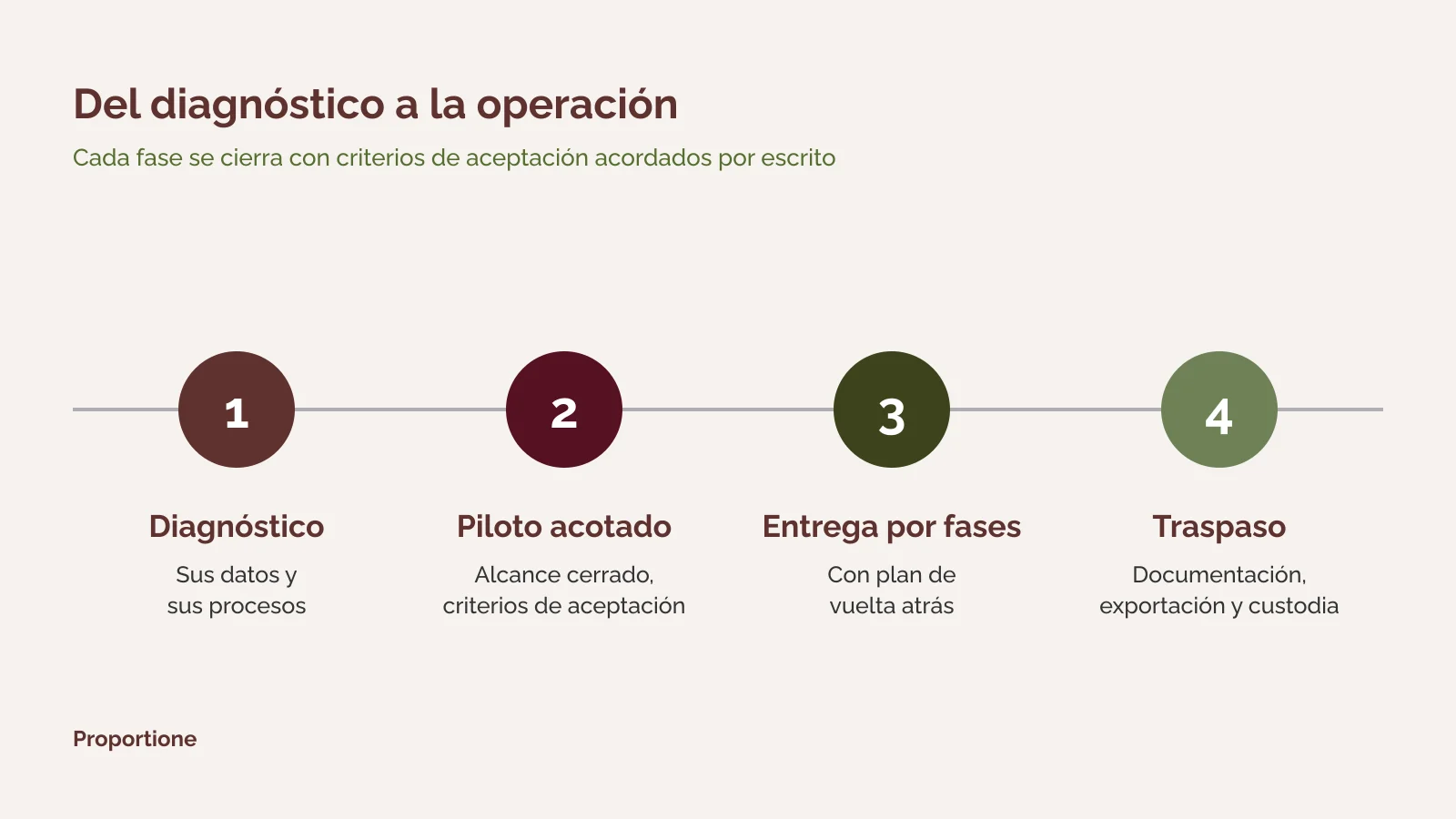
Diagram of four phases of custom software development: diagnosis, limited pilot, phased delivery, and handover

Where it fits well: three common uses

Notifications and small approval workflows

A form that feeds into a sheet and, upon receiving a response, notifies by email the person who needs to review it. A weekly reminder of pending rows. These are processes with few steps, few people, and little history: the natural terrain of Apps Script.

Sheets that perform calculations or reports

A custom function that queries another sheet, a macro that formats a report every month, a menu that triggers an export. This works as long as the calculation is understandable and maintained by someone.

Connecting Workspace tools together

Save attachments from certain emails to a Drive folder, create a calendar event from a row, generate a document from a template. All without leaving Google.

What it means for you: knows which automations are legitimate and small, and can leave them where they are. Next step: make a list of the scripts and macros that already exist, who created them, and who uses them.

The limits to know before depending on it

Apps Script has quotas. According to the Google quotas table, each execution can last a maximum of 6 minutes, and there is a total daily time for triggers that is different in a personal account and a Google Workspace account. There is also a maximum number of email recipients per day and calls to external services per day, with different values depending on the type of account.

There are other limits that are not quotas, but design-related:

Therefore, before investing in a script, it is worth asking what happens the day it fails: who finds out, who fixes it, and what process is stopped.

Signs that it is no longer enough

A speaker at a conference on information systems

What it means for you: recognizes when a script is already an unnamed application. Next step: ask us for a diagnosis and to list the scripts, spreadsheets, and macros that support processes.

Request your Proportione Legacy diagnosis

What to do when you need to make the leap

Making the leap doesn't mean throwing away what works. The order is as follows:

1. Inventory. What scripts, spreadsheets, and macros exist, who uses them, what data they touch, and what depends on what. 2. Decide what stays. Small and stable things remain in Apps Script, with their owner and documentation. 3. Turn what requires it into an application. A process with steps, owners, history, and multiple users is planned as custom software development: an application with its database, which remains connected to Workspace so that email, files, and forms function as before. We design and develop custom software for companies. 4. Connect, don't rewrite. If the process interacts with other programs, it is connect via APIs and connectors instead of duplicating data.

If what's behind the scripts is a spreadsheet that already acts as a management system, see from spreadsheets and macros to an application. The method for inventorying macros, one by one, is in macros and spreadsheets that act as applications. If the new application is hosted on Google Cloud, see migration to Google Cloud. The big picture is in legacy systems migration service.

What you receive and how to proceed

The method is the same whatever the case. General details are in how we work.

1. Diagnosis: process and data inventory, options (build, buy, or connect), and phased scope proposal. 2. Scoped pilot, with pre-established acceptance criteria before proceeding, when the case requires it. 3. Phased delivery, with acceptance criteria and a rollback plan. 4. Handover: verifiable documentation, export, and custody. The code is yours, and that is stated in the contract.

What it means for you: at all times you know what has been delivered, what is missing, and how to roll back. Next step: request the diagnosis.

Frequently Asked Questions

What is Google Apps Script?

It is Google's platform for programming over Workspace. It uses JavaScript, is edited from the browser, and scripts are saved in Drive and executed on Google's servers. It is used to automate Spreadsheets, Gmail, Calendar, Drive, and Forms.

Is Apps Script free?

It can be used with a Google account, and there are different quotas for personal and Google Workspace accounts. The conditions and limits are set by Google and may change; the current table is in their documentation.

How many emails can a script send per day?

There is a daily limit of recipients, different for personal and Google Workspace accounts. The current value is in the Google quotas table. If your process sends mail in volume, it's a signal to consider another solution.

What happens to a script when the person who created it leaves the company?

Installable triggers run with the account of the creator. If that account is deleted or loses access, the trigger stops working. It is advisable for each script to have a responsible person and documentation, and for critical processes not to depend on a personal account.

When is Apps Script sufficient, and when is an application necessary?

It is sufficient as long as the process is simple, few people use it, and a failure does not stop other teams. An application is needed when there are steps with responsible persons, history, different permissions by role, or connection with other systems. The diagnosis clarifies it with data from your case.

How much does it cost and how long does it take to go from a script to an application?

It depends on the scope: how many processes, how many people, what data, and what systems need to be connected. That is why we do not give a figure or a deadline without knowing your case. The phased scope proposal is where it is specified.

Who owns the code and documentation?

The code belongs to the client, and this is explicitly stated in the contract. Documentation, exportability, and custody are verifiable and form part of the design.

Request your Proportione Legacy diagnosis

Tell us what your spreadsheet or script does today and who depends on it. We will respond within two business days. [Short form: see specification in notes] If you prefer to write to us directly: contact.

Request your Proportione Legacy diagnosis

Do not send credentials or databases. We will use your data only to respond to you; more information in the Privacy Policy.