Migration to Google Cloud: what is moved, to which service, and how it is operated afterward
If you already work with Google Cloud, or are thinking of moving an application, your data, or your database there, this page explains the usual destinations and how to proceed without betting everything on a single step. We start with a diagnosis of your data and processes before choosing a destination.
If you already work with Google Cloud, or are thinking of moving an application, your data, or your database there, this page explains the usual destinations and how to proceed without betting everything on a single step. We start with a diagnosis of your data and processes before choosing a destination. Google Cloud is an option, not an obligation.
To start, simply describe what you want to move and what it is used for today. Do not send credentials or databases.
Before choosing a destination, a diagnosis of your data and processes is made.
There are four common paths: an application on Cloud Run, data in BigQuery, a database in Cloud SQL or Firestore, and a deployable setup using Google Cloud's command-line tool. These are not mutually exclusive.
Delivered in phases, with acceptance criteria and a rollback plan.
The code is yours, and this is reflected in the contract.
Cloud is not mandatory: there is also an option for on-premises installations.
A migration to Google Cloud is planned in pieces, not by platform
“Migrating to Google Cloud” brings together disparate elements: moving an application, transferring data for analysis, changing databases, or eliminating manual configuration. Each has its own service and risks. Therefore, the first question isn't “Which service should I use?”, but rather “What does this do today and who depends on it?”.
We operate our own internal systems on Google Cloud (Cloud Run and Firestore). In one anonymized case, a management system reliant on outdated third-party software was migrated to a proprietary platform deployed on Google Cloud Run. With this foundation, we address the sections below; for each scenario, the diagnosis confirms if the destination is suitable.
What it means for you: knows exactly which piece to move and to which service, before anyone starts configuring anything. Next step: choose the section below that best matches your case.
Migrate an application to Google Cloud Run: containers, scaling, and no servers to manage
Cloud Run is the Google Cloud service for running container-packaged applications. According to Google's documentation on Cloud Run, code written in any language can be deployed if a container image can be built with it, without creating a cluster or managing infrastructure, and the service scales to handle incoming requests.
Migrating an application to Cloud Run is, therefore, preparing that application to run as a service in a container: separating configuration from code, removing everything from the application that is stored on the server's disk, and leaving the data in a separate database. In the case of a desktop application, such as one made in Access, what is deployed there is the new application that replaces it; the specific case is in updating Access to Google Cloud Run.
What to consider before containerizing an application
What the application stores on the server itself (files, sessions, scheduled tasks) and would not survive a container change.
What other systems it talks to and with what credentials.
What data it needs and where it will live.
How to roll back if a phase does not meet what was agreed.
What it means for you: the application ceases to depend on a specific server and how it runs is put in writing. Next step: request the diagnosis and indicate which application you want to migrate.
Questions about migrating an application to Cloud Run
Can any application run on Cloud Run?
Any application that can be packaged into a container image and run as a service. An application that depends on a desktop computer, files on a local disk, or a component that cannot be installed in a container needs changes beforehand. The diagnosis lists them piece by piece.
Does the application need to be rewritten to migrate it?
Not always. Sometimes it is enough to package it and sort out where it stores its data; other times, to rebuild the parts that do not fit. This is determined in the diagnostic, with the inventory in front of us, rather than by the name of the service.
Who is responsible for the application once deployed?
This is defined in the phased proposal: either your team operates it, using the delivered documentation, or we operate it. In both cases, the code belongs to you, and that is stipulated in the contract.
Migrate data to BigQuery: from spreadsheets, databases, and exports to analytics
BigQuery is Google Cloud's service for analyzing data. In its documentation, Google indicates that data can be batch loaded from local files or from Cloud Storage, in formats such as CSV, JSON, Parquet, or Avro, and also received continuously.
Moving data to BigQuery is not about uploading files: it's about defining which data answers which business question. The most common sources are three: spreadsheets that someone updates manually, the database of an old application, and periodic exports from other programs. Each requires its own order before loading, because data that is duplicated or lacks criteria at the source remains so at the destination.
What is resolved before loading
What questions the data must be able to answer and who asks them.
Which sources are the correct ones and which are copies.
Which fields have the same name but mean different things.
What personal data exists and who can see it.
What it means for you: analysis starts with organized data with an owner, not with a collection of files. Next step: describe in the form where your data comes from today. If what you need is for systems to talk to each other before analyzing, start by integrating old software with APIs and connectors.
Yes, spreadsheets can be exported and uploaded. The important thing is not the upload itself, but that the format is stable: if each person uses different columns, they must first be unified.
Does BigQuery replace my application's database?
That is not its function. BigQuery is used for analysis; an application's database is used to keep the application running. The standard approach is to maintain both and send an organized copy of what needs to be analyzed to BigQuery.
Do the data have to leave our premises to be analyzed?
It depends on what is agreed upon. If, due to policy or contract, the data must not leave, there are alternatives for on-premises facilities, which are evaluated in the diagnosis alongside the cloud option.
Migrating a database to Cloud SQL or Firestore: depending on what your data is like
They are two services with different purposes. Cloud SQL is, depending on your documentation, a managed relational database service for MySQL, PostgreSQL, and SQL Server. Firestore is a document database with no fixed table schema; it is the one we use in our own internal systems.
The choice is not about fashion, but about the shape of the data. If your information consists of tables with clear relationships between them (customers, orders, invoices) and your application queries them with SQL, the natural fit is a relational database. If they are documents with a changing structure that are read by their identifier, a document database fits better. Changing from one to the other is not just moving files: it is rethinking how the application requests the data.
What to look at before moving a database
What database and what version exist today, and which queries use it.
Which tables or collections are actually used and which are leftovers.
Who writes data and who only queries it.
How to verify, after moving, that the destination data matches the source data.
How to roll back: the rollback is prepared before the change, not after.
What it means for you: knows which database fits your data and how much of the application needs to be touched to change it. Next step: request the diagnosis and indicate what database you have.
Questions about migrating a database to Cloud SQL or Firestore
Can you migrate to Cloud SQL without changing the application?
It is one of the options considered when the current database uses the same engine offered by the service. Then the change focuses on the connection and data transfer. If the engine is different, you need to review which queries still work and which need to be rewritten.
When does Firestore make sense and when does a relational database?
Firestore fits data in the form of documents that are read by their identifier; a relational database fits data in related tables and cross-queries. The diagnosis contrasts this with your actual queries, not with a general rule.
How do you verify that nothing is missing after the transfer?
What is compared (counts, totals, samples) and what acceptable difference is defined beforehand. It is verified at the end of each phase, with acceptance criteria set before starting, and a rollback plan is ready in case they are not met.
Deploying and operating with gcloud: repeatable infrastructure
The Google Cloud command-line tool, `gcloud`, is, according to its documentation, a set of tools to create and manage Google Cloud resources, which can be used from a terminal or from scripts.
What matters to you is not the tool, but what it enables: having application, database, and permission configurations written in re-runnable commands, rather than depending on what someone once did in the console. Such an environment can be replicated in another project, reviewed before modification, and delivered fully documented.
What is delivered so you can operate without us
The commands and configuration files used to deploy each piece.
A document detailing what resources exist, what they are used for, and who has access to each one.
The rollback steps for each phase.
The verified data export, ensuring system exit is possible.
What it means for you: the system does not depend on one person's memory, nor on ours. Next step: request the diagnosis and tell us who will operate the system afterwards.
Questions about deploying and operating with gcloud
Do you need to know how to use gcloud to operate the system?
Not necessarily. The provided documentation explains how each step is executed. Whoever operates it will need permissions and basic training, which are agreed upon in the phased proposal.
What happens if later on we want to move it somewhere else?
A deployment described in files, with the code and data export in your possession, allows you to do this without starting from scratch. It is part of the design: verifiable documentation, export, and custody.
What you receive and how to proceed
Whatever the destination, the method is the same. The general details are in how we work.
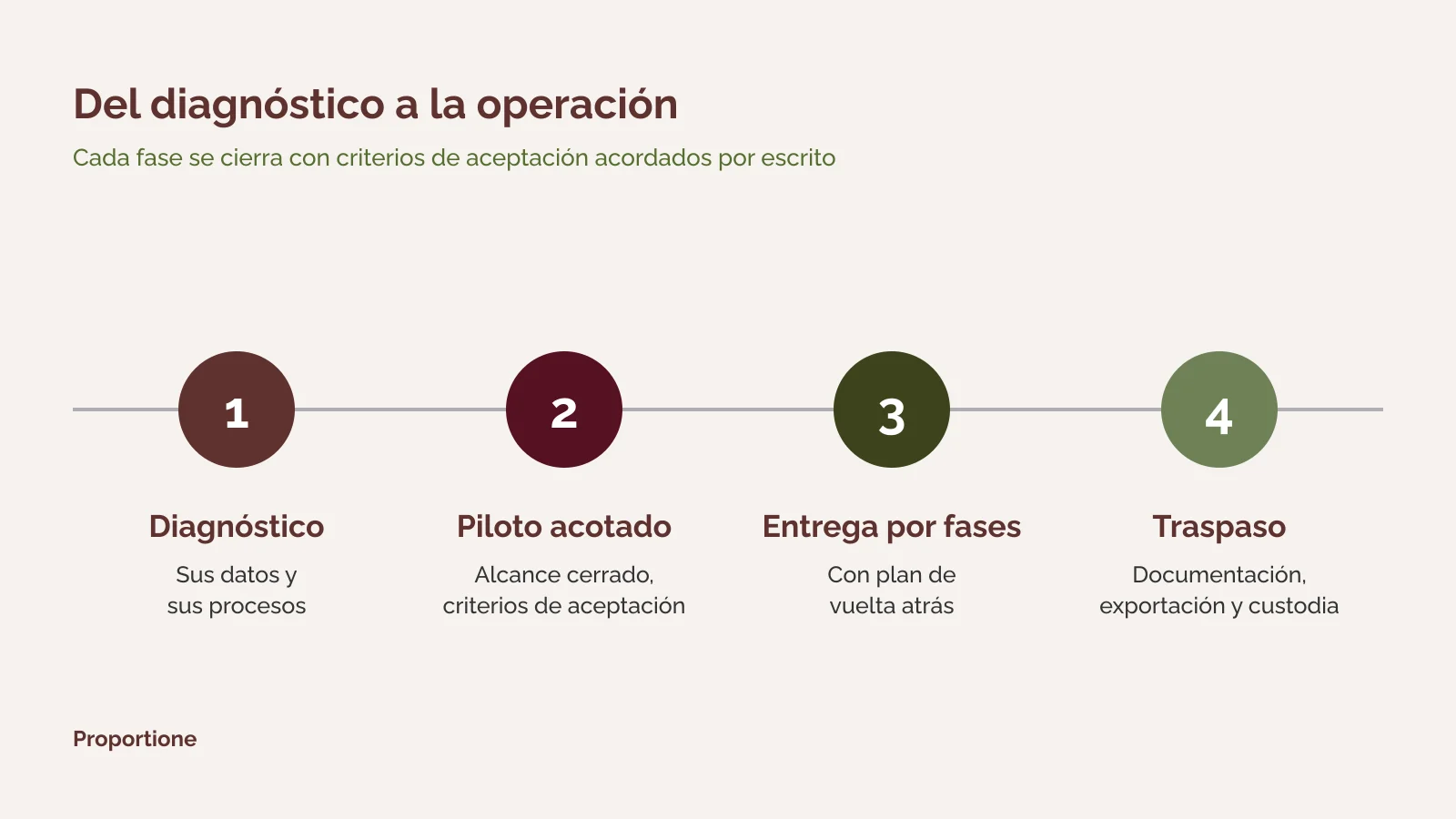
1. Diagnosis: inventory of processes and data, options (build, buy, or connect), and phased scope proposal. 2. Bounded pilot, with acceptance criteria set in advance, before proceeding, when the case requires it. 3. Phased delivery, with acceptance criteria and rollback plan. 4. Handover: verifiable documentation, export, and custody. The code belongs to you, and that is stated in the contract.
If what you need is to build the system that will go to Google Cloud, see custom software development; and if Google Cloud is just one of several legacy pieces that need to be organized, view the whole picture in legacy systems migration service.
What it means for you: at all times you know what has been delivered, what is missing, and how to roll back. Next step: request the diagnosis.
First the process, then connecting, and finally AI
The order is always the same: first, the process is digitized and understood; then, legacy software is opened up with APIs and connectors to link it with the rest, and only then is AI considered on top.
AI can run on your own server and, if necessary, offline. This is the same option we described in artificial intelligence in business. Google's cloud is just one more option, not the only one nor a mandatory one.
What it means for you: your data does not have to leave your premises. Next step: if you want to see the full scope of what we do, consult Business Management Consulting and our services.
Frequently Asked Questions
Where do we start migrating to Google Cloud?
For a diagnosis of your data and processes, before choosing a destination. It delivers a process and data inventory, the options (build, buy, or connect), and a phased scope proposal.
Does everything have to be moved to Google's cloud?
No. The cloud is not mandatory. Extraction, migration, and any subsequent AI can run on your servers or dedicated hardware, even on an offline network. What goes to the cloud and what stays on-premise is agreed upon piece by piece in the proposal.
How much does it cost and how long does it take?
It depends on the scope: what is being moved, how many pieces there are, and what each one needs to do afterwards. That is why we do not give a figure or a timeframe without knowing your case. The phased scope proposal is where these details are finalized.
What happens if something does not go as planned during the transition?
It is delivered in phases, with acceptance criteria and a rollback plan, so that each step can be verified and, if necessary, undone. The rollback plan is part of the design: it is defined before touching anything.
Who owns the code and configuration?
The code belongs to the client, and this is explicitly stated in the contract. Documentation, exportability, and custody are verifiable and form part of the design.
Do you have experience with Google Cloud?
We operate our own internal systems on Google Cloud (Cloud Run and Firestore) and, in an anonymous case, a management system that relied on third-party software with no evolution was moved to a proprietary platform deployed on Google Cloud Run. For the rest of the services on this page, the diagnosis confirms whether they fit your case.
Tell us what you want to move to Google Cloud and what destination you have in mind. We will reply within a maximum of two business days. [Short form: see specification in notes] If you prefer to write to us directly: contact.
We use cookies to ensure that we give you the best experience on our website. If you continue to use this site, we will assume that you are happy to do so.