Updating or migrating Moodle
Your Moodle platform hasn't been touched in years. It works, but it's getting harder to maintain: the server is old, nobody dares to touch the plugins, and the version no longer receives security fixes.

Your Moodle platform hasn't been touched in years. It works, but it's getting harder to maintain: the server is old, nobody dares to touch the plugins, and the version no longer receives security fixes.
Your Moodle platform hasn't been touched in years. It works, but it's getting harder to maintain: the server is old, nobody dares to touch the plugins, and the version no longer receives security fixes. We help you bring it to a supported version, or to another server or to the cloud, starting with a diagnosis before touching anything.
To start, just describe your platform. Do not send credentials or database copies.
Request your Proportione Legacy diagnosis

The Moodle project only supports recent versions. When support ends for each one is published by the project itself on its versions page. A platform that has been left behind stops receiving fixes and, with each year, the jump to a supported version becomes longer.
On a training platform, the problem is not just technical. There are courses in progress, people taking exams, and grades that someone will need to be able to consult in five years. That's why the work is planned in phases and not as a single-step change.
What it means for you: know where your platform stands and what options you have before deciding. Next step: the diagnosis, which we describe below.
Updating a very old version is usually not a single step. The official Moodle documentation indicates that from old versions, you must first go through intermediate versions, and recommends testing the update on a copy of the production site before touching the real site ("official upgrade guide).
A major version jump affects three things at once:
Our approach is the same as with any other system: inventory of what exists, chosen version path with data, testing on a copy, phased delivery with acceptance criteria, and a rollback plan.
What it means for you: a written path, with each step verifiable, instead of a blind update. Next step: request the diagnosis.
Migrating means changing where the platform lives: from a self-hosted server that you no longer want to maintain to another server, or to the cloud. The general case of migrating self-hosted servers to the cloud has its own page. Moodle consists of three parts that must be moved together and coherently: the software, the files, and the database. The official guide asks for a backup of all three before any changes.
Before choosing a destination, we compare options with data from your case, including self-hosted servers, cloud, and a combination of both. If there are privacy requirements, the migration and the AI used afterward can be run on your own server and, if necessary, without an internet connection.
What it means for you: the destination is chosen based on criteria, not by trend or by the provider you already have. Next step: tell us where your Moodle lives today.
What matters to the platform manager is what happens after the change. We address this by categories, and each is checked at the end of each phase:
We do not assume that everything will be preserved the same. What we do is establish in advance, in writing, what needs to be checked and how, and prepare for rollback. Documentation, export, and verifiable custody are part of the design.
What it means for you: knows in advance what will be checked and when each step is considered complete. Next step: request the diagnosis to obtain the inventory.
We start with a diagnosis of your data and processes before choosing a destination. It delivers an inventory of processes and data, options (build, buy, or connect), and a phased scope proposal. The general details of the method are in how we work.
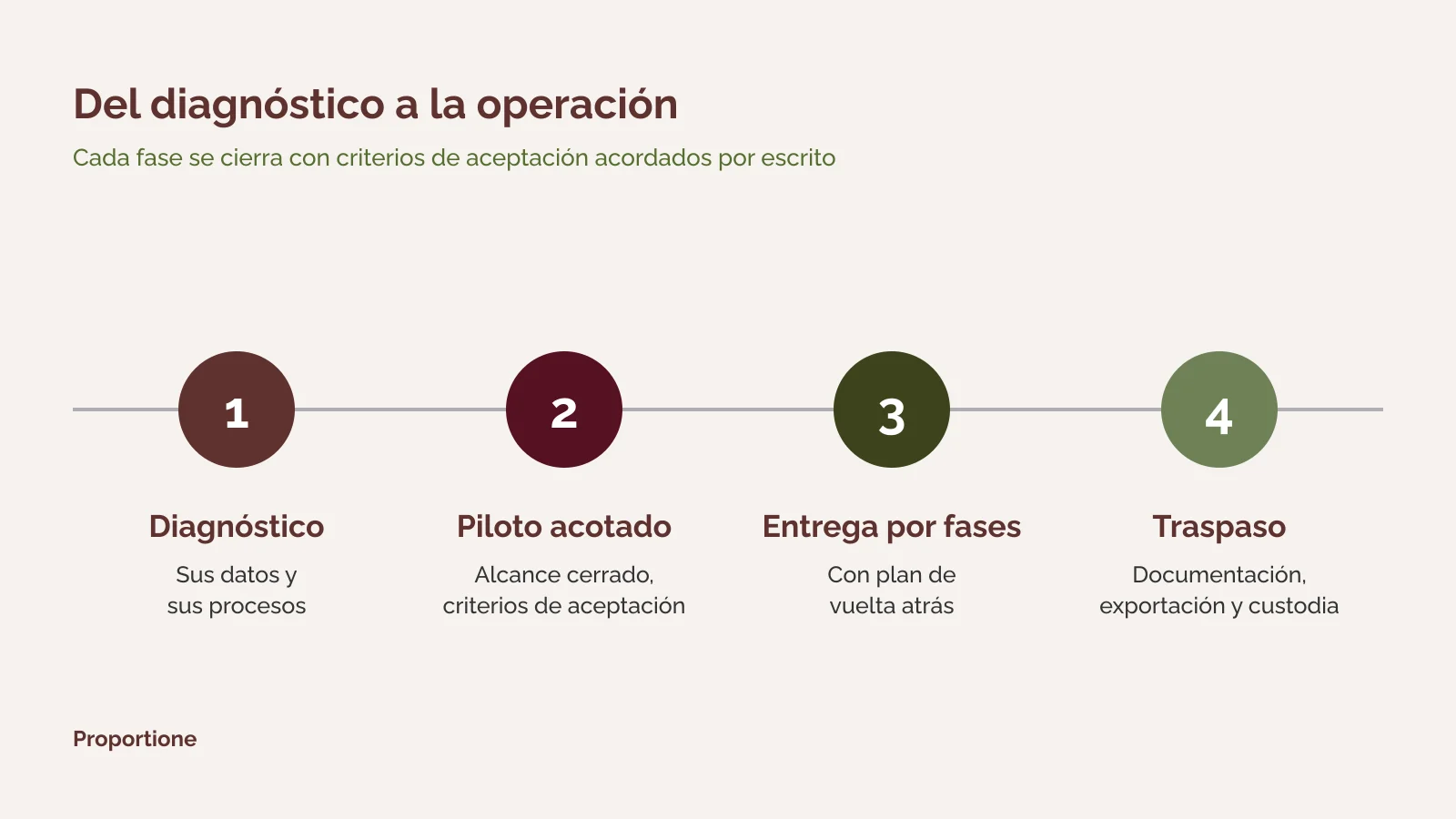
What it means for you: at all times you know what has been delivered, what is missing, and how to roll back. Next step: request the diagnosis.
Order matters. First, digitize and understand the operation: what the platform does, who uses it, and what data it moves. Then, if there are other systems (administration, billing, human resources), connect them with APIs and connectors. Only then does AI on top make sense.
AI can run on its own server and, if necessary, without an internet connection. If you need custom development around your platform, we explain it in custom software development. If you have a custom PHP application without support, not Moodle, see migrating from PHP 5 to a supported version. If your platform is just one of several legacy pieces, the whole system is covered in legacy systems migration service.
What it means for you: nothing unprepared is advanced. Next step: see how it fits into artificial intelligence in business or review our services.
Not always. From older versions, official documentation indicates that you must go through intermediate versions. The path is determined during the diagnosis, using data from your platform, and is tested on a copy before touching the production site.
No. Updating is changing the Moodle version; migrating is changing where it is hosted. They can be done together or separately, and the diagnosis determines the order.
We do not take that for granted. A prior backup is made, it is tested, and acceptance criteria are established by category before each phase, along with a rollback plan. What is verified and how it turns out is put in writing.
Each item is decided one by one during the diagnosis: update it, replace it with another, develop an alternative, or retire it if it is no longer used. What to do with each one is part of the phased scope proposal.
Yes. Data extraction, migration, and any AI used subsequently can be run on your servers or on dedicated hardware, even on an offline network.
It depends on the version jump, the plugins, and the environment. That is why we do not give a figure or a deadline without knowing your case. The diagnosis ends with a phased scope proposal, and from there it is finalized.
Tell us where your Moodle is currently and where it's hosted. We'll respond within two business days. [Short form: see specification in notes] If you prefer to write to us directly: contact. Our overall offering is in business management consulting.
Request your Proportione Legacy diagnosisDo not send credentials or databases. We will use your data only to respond to you; more information in the Privacy Policy.